
Many market apps can show prices, percentage changes, and candlestick charts.
But for users who truly research stocks, validate strategies, and execute trades, seeing market data is only the first step.
The more important questions come next:
- Why is this stock worth further research?
- Is the current trend more suitable for a trend-following strategy or a reversal strategy?
- Do the fundamentals support continued observation?
- Have news, earnings reports, or announcements created new opportunities or risks?
- Can this stock be used directly for strategy backtesting?
- If the results look good, can it be turned into a trading action?
- How have my past trades on this stock actually performed?
The newly launched Market Tab in PulseForce is designed around this real decision-making path.
It is not an isolated market quote page. Instead, it is an intelligent entry point that connects market data, AI analysis, financial research, strategy backtesting, and trade execution.
Starting from a single stock, users can move more smoothly through the complete process of discovering opportunities, understanding a target, validating ideas, and taking action.
Why We Redesigned the Market Tab
The typical workflow in traditional market apps is:
Check market data → Make your own judgment → Go elsewhere to research or trade
What PulseForce aims to build is:
Check market data → View analysis → Review fundamentals → Run backtests → Create tasks → Execute trades → Review results
The difference is not simply “more features.”
PulseForce focuses on a more important question:
How can users move from “seeing a stock” to “making a more informed decision”?
That is why the new Market Tab is no longer just a place to display price movements. It naturally connects stock research, AI analysis, financial information, historical trades, and strategy capabilities, helping users turn ideas into actions that can be validated, executed, and reviewed.
Highlight 1: Bringing Together the Stocks That Truly Matter to You
In many apps, a watchlist is essentially just a manually saved list.
PulseForce’s Market Tab goes a step further. It brings together more meaningful stocks based on the user’s real trading context, including:
- Stocks you actively follow
- Stocks you currently hold
- Stocks linked to your automated trading tasks
The value is direct and practical.
When you open the Market Tab, you do not just see “what I once saved.” Instead, you can more easily see:
- Which stocks are affecting my account
- Which stocks are already part of my strategy view
- Which stocks deserve priority tracking
- Which symbols appear across holdings, watchlists, and task systems
For quantitative trading users, this type of aggregation is more meaningful than a regular watchlist.
Because what truly matters is not “which stocks I once bookmarked,” but “which stocks are connected to my capital, strategies, and results.”
Highlight 2: From Market Discovery Directly into Deeper Research
The Market Tab is not just a list.
It also serves as an opportunity discovery entry point. Users can quickly identify stocks worth further research from the market, then enter the stock detail page with one tap to continue exploring.
However, PulseForce does not focus on simply displaying rankings. Its real focus is turning “discovery” into the starting point of research.
After opening a stock, users can continue to view:
- Chart trends
- Related news
- AI comprehensive analysis
- Financial quality
- Analyst ratings
- Company announcements
- Earnings information
- Dividend records
- Insider transactions
- Peer company comparisons
- Historical orders and trading records
- Backtesting and strategy entry points
This means users do not have to stop at a shallow judgment such as “this stock is rising, I’ll save it for later.” Instead, they can naturally continue answering:
Is this stock worth researching? Is it worth validating? Is it worth acting on?
Highlight 3: AI Comprehensive Analysis Helps Users Grasp the Key Points Faster
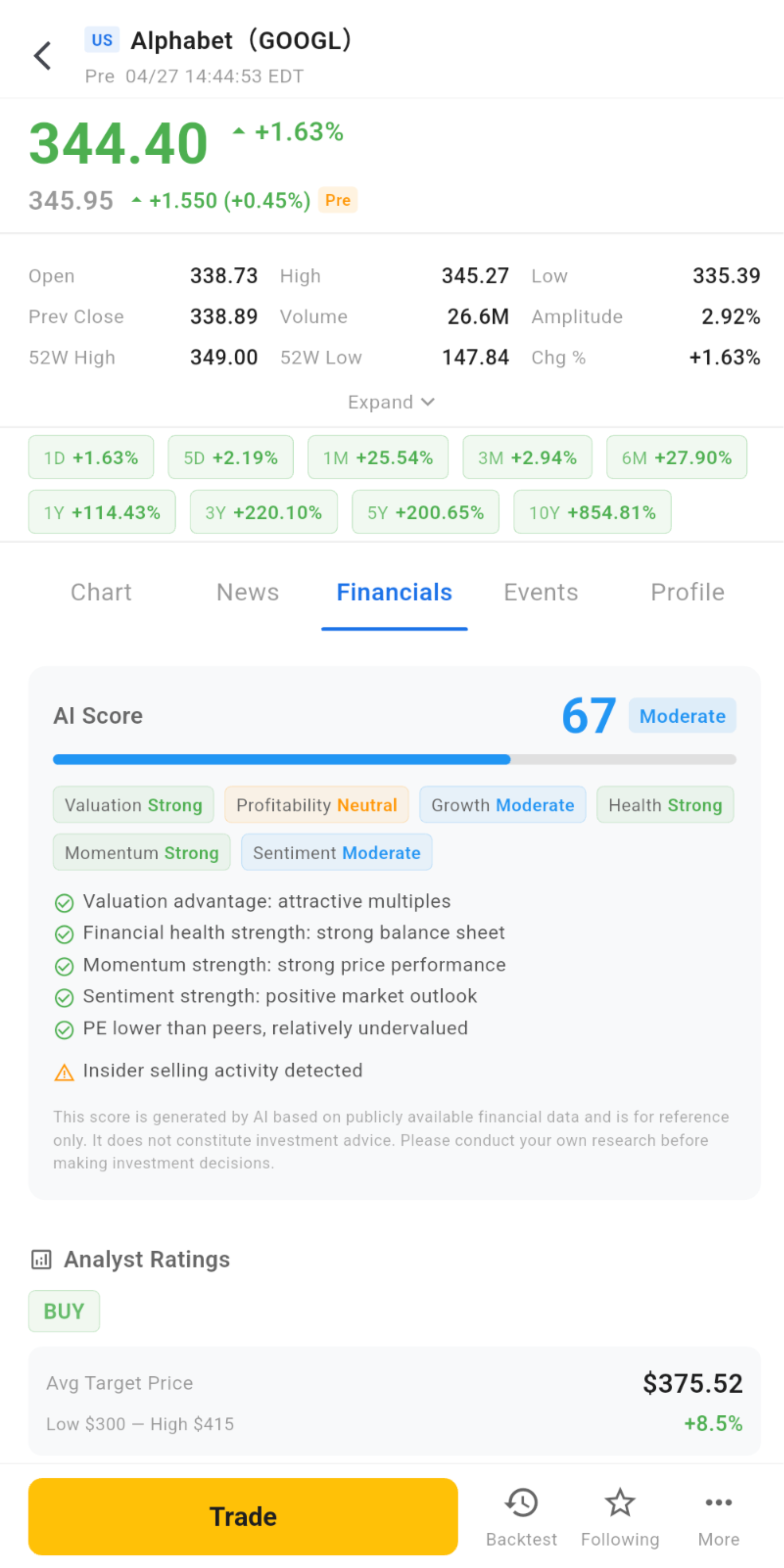
When researching a stock, the biggest challenge is often not a lack of information, but too much information.
Price, volume, news, financials, valuation, ratings, announcements, peer comparisons…
The more data there is, the harder it can be to know what to look at first.
That is why PulseForce adds AI Comprehensive Analysis to the stock detail page, helping users form a faster overall understanding of a stock.
AI evaluates the stock across multiple structured dimensions, such as:
- Valuation: whether the stock appears reasonably valued
- Profitability: whether profitability is healthy
- Growth: whether growth potential is attractive
- Health: whether the financial structure is stable
- Momentum: whether price momentum is strong
- Sentiment: whether market sentiment is positive
The value of AI is not to make decisions for the user, but to help users answer key questions more quickly:
- What are this stock’s most prominent strengths right now?
- What factors are dragging on its performance?
- Does the current situation lean more toward opportunity or risk?
- Is it worth deeper research?
- What type of strategy idea might it be more suitable for?
For users who review many stocks regularly, this experience of “building an initial judgment first, then deciding whether to go deeper” is much more efficient than simply piling up data.
Highlight 4: Bringing the Most Commonly Used Stock Research Information into One Place
When researching a stock, many people often switch between several platforms:
- One place for charts
- One place for financials
- One place for news
- One place for ratings
- One place for regulatory filings
- One place for peer comparisons
PulseForce aims to bring these high-value pieces of information into one research workflow as much as possible.
In the stock detail page, users can conveniently view:
- Analyst ratings
- Target price ranges
- Financial health
- Revenue structure
- Growth metrics
- Profitability
- Solvency
- Operating efficiency
- Valuation metrics
- Per-share metrics
- Company profile
- Peer companies
- Peer valuation comparisons
The value is not just convenience.
It helps users upgrade their understanding of a stock from “only looking at price” to “understanding the company, quality, positioning, and risk.”
For example, you can more quickly identify situations such as:
- The trend looks good, but valuation is no longer cheap
- Momentum is strong, but financial quality is average
- The stock price is volatile, but it may simply be moving with the broader industry
- Revenue growth looks impressive, but cash flow may not be improving at the same pace
- Market sentiment is optimistic, but earnings are approaching and risk is not low
These types of judgments are often among the most important parts of trading decisions, yet they are also the easiest to overlook.
Highlight 5: Putting Company Events Back into the Context of Price Movements
Stock movements are often not random.
They may be driven by earnings reports, dividends, stock splits, regulatory filings, insider buying or selling, rating changes, or other important announcements.
That is why PulseForce also integrates key company event information into the stock detail page, helping users better understand “why the stock is moving.”
Users can view:
- Corporate actions
- Earnings calendar
- Dividend history
- SEC filings
- Insider transactions
This is highly practical.
Many times, users do not simply want to know “why did it drop today?” They also want to know:
- Is an earnings report coming soon?
- Have there been any important announcements recently?
- Did the company recently have a stock split, dividend, or other corporate action?
- Are insiders continuously buying or selling?
- Are there any regulatory filings worth paying attention to?
When this information is placed in the same research path, users can gain a more complete understanding of stock movements. This also provides a stronger basis for subsequent backtesting or strategy decisions.
Highlight 6: Enter Strategy Backtesting Directly from the Stock Detail Page
This may be one of the most important differences between PulseForce and ordinary market apps.
Many market products separate “research” from “validation.”
After reviewing a stock, users often need to go to another system to test strategies. The workflow is interrupted, and ideas can easily remain at the level of “it feels good.”
PulseForce directly connects the stock detail page with backtesting capabilities.
When researching a stock, users can enter the backtesting process directly from the current page. The selected stock is automatically carried into the workflow, allowing users to quickly test strategy performance.
For example:
View NVDA → Review trend and AI analysis → Enter backtesting → Select Momentum / MACD / RSI strategies → View historical performance
This action may look simple, but it represents a completely different product philosophy:
Do not just help users generate ideas — help them validate ideas immediately.
This is one of the core values PulseForce aims to provide:
turning “I think this stock may be promising” into “I have tested how a strategy historically performed on this stock.”
For quantitative users, this step is critical.
Because in trading, the most valuable thing is often not an opinion, but a validated opinion.
Highlight 7: The Market Page Naturally Connects with Automated Trading Tasks
PulseForce is not simply a market-watching tool. It is a platform built around strategies and automated trading.
Therefore, the value of the Market Tab is not only helping users watch stocks, but allowing stocks to become truly connected with the task system.
In PulseForce, when users see a stock, they may naturally think of questions such as:
- Is this stock suitable for creating a strategy task?
- Is there already a related task running?
- Which stocks are my tasks currently tracking?
- Are my current holdings consistent with my task logic?
- Does the recent performance of this stock support continuing the current strategy?
Once the market page is connected with the task system, a stock is no longer just a ticker symbol. It becomes a real node in your strategy workflow.
This is what makes PulseForce different from traditional market apps:
It does not treat “market data” as the end point, but as the starting point of the entire quantitative workflow.
Highlight 8: Review Historical Orders Directly from the Current Stock
People who actually trade often share one experience:
After some time, you may forget what you did on a particular stock, where you were right, and where you made mistakes.
That is why PulseForce adds an entry point for historical orders related to the current stock, helping users review their past actions more quickly.
You can review the current stock from the perspective of:
- Where you previously bought or sold
- Which orders were filled
- Which orders were canceled
- Whether historical execution matched expectations
- Whether this stock was truly suitable for your strategy in the past
This turns the stock detail page into more than a place to look for future opportunities. It also becomes an entry point for reviewing past behavior.
For quantitative trading, review is never optional. It is an important part of continuous improvement.
Highlight 9: Connect Your Own Alpaca Account and Enter a Real Trading Environment
PulseForce uses the user’s own Alpaca account to connect holdings, orders, trading permissions, and market data.
This means what users see in PulseForce is not a static research page disconnected from their account. Instead, it is an interface connected to their real trading environment.
Based on your own account status, you can:
- View holdings
- View orders
- Track related stocks
- Continue researching targets
- Start strategy validation
- Decide whether to create further trading actions or tasks
It should be noted that the market data range and data capabilities available in PulseForce are affected by the user’s Alpaca account permissions and data subscription status.
In other words:
- PulseForce provides research, analysis, backtesting, and trading tool capabilities
- The Alpaca account determines the data permissions and trading permissions available to the user
This design makes PulseForce especially suitable for users who already use Alpaca, or who plan to access the US stock trading environment through Alpaca.
One Page System That Completes the Loop from Research to Action
What the Market Tab truly aims to solve is not simply “letting you glance at a price.”
It aims to connect the most important steps in trading decisions:
Discover stocks → View details → Read news and announcements → View AI analysis → Review financials and valuation → Compare peers → Start backtesting → View historical orders → Decide whether to take further action
This path is exactly where PulseForce’s product value lies.
Because it is not designed only for users who want to “check market data.” It is designed for users who want to turn market data into:
- Researchable targets
- Validatable ideas
- Executable strategies
- Reviewable results
Who Is It For?
Users Who Want to Research US Stocks More Efficiently
If you often switch between multiple platforms just to piece together complete information about a stock, PulseForce can make the process more centralized and smoother.
Users Who Already Use Alpaca
If you already have your own Alpaca account, PulseForce can naturally connect your account, holdings, orders, market data, and strategy capabilities.
Users Focused on Strategy Backtesting and Quantitative Trading
If you do not just want to “look at a stock,” but want to further validate whether it is suitable for a certain type of strategy, the connection between the Market Tab, backtesting, and task system will be highly valuable.
Users Who Want to Use AI to Improve Research Efficiency
If you do not want to manually filter through large amounts of financial data, news, and indicators one by one, AI Comprehensive Analysis can help you quickly capture the key points before deciding whether to go deeper.
We Will Continue Strengthening This Workflow
The new Market Tab is just the beginning.
In the future, PulseForce will continue to strengthen the connection between market data, analysis, strategies, and trading, making it not just a “stock detail page,” but more like a real decision-making workspace for trading.
For example:
- Stronger linkage between charts and strategy signals
- Deeper AI analysis and explanation capabilities
- Smarter opportunity discovery entry points
- More complete account and portfolio views
Our goal is clear:
Starting from a single stock, users should be able to move more naturally toward research, validation, execution, and review.
Risk Disclaimer
The PulseForce Market Tab provides market display, data integration, AI analysis, strategy backtesting, and trading assistance capabilities. It does not constitute investment advice.
Users should still be aware that:
- Different Alpaca accounts may have access to different market data ranges and data capabilities
- AI analysis is for reference only and does not guarantee future returns
- Financial data, news, and market data may be delayed, incomplete, or inaccurate
- Backtesting results do not represent future live trading performance
- Users should make independent decisions based on their own risk tolerance
Conclusion: Turning Market Data from an Information Entry Point into a Decision Starting Point
Many products turn the market page into a place to “check prices.”
But in PulseForce, the positioning of the Market Tab is clearer:
It is not a browsing page before trading. It is the starting point for research, backtesting, and trading.
From here, you can begin with:
Check market data → View analysis → Review financials → Read announcements → Run backtests → Connect tasks → Review orders
This is the direction PulseForce will continue to refine:
Make every trading decision clearer;
Make every strategy idea easier to validate;
Make every historical result truly become a better judgment for the next decision.
Experience the new Market Tab in PulseForce.
👉 Download on Google Play:
https://play.google.com/store/apps/details?id=ai.hiforce.PulseForceEu